
 checkout on the customer's phone
EmberPay Cash App Checkout: we watched the live demo so you don’t have to
Most “new payment method” demos are slideware. The EmberPay demo isn’t: it runs a real order — a $3.99 product on a test WooCommerce storefront — all the way from the cart to a completed order and a line in the transaction report. Here is what the video shows, what stood out, and what merchants should know before switching it on.
The checkout: no card number, no friction
The demo opens on an ordinary WooCommerce store — “nothing new to learn,” as the on-screen note puts it. At checkout the shopper sees “Pay with Cash App, powered by EmberPay” as a payment option, with a short note that they will be redirected to Cash App to finish. They select it and press Place order. That’s the entire merchant-side change to the buying experience; billing details stay exactly as they were, and the video says the plugin installs in about five minutes.
The handoff to Cash App
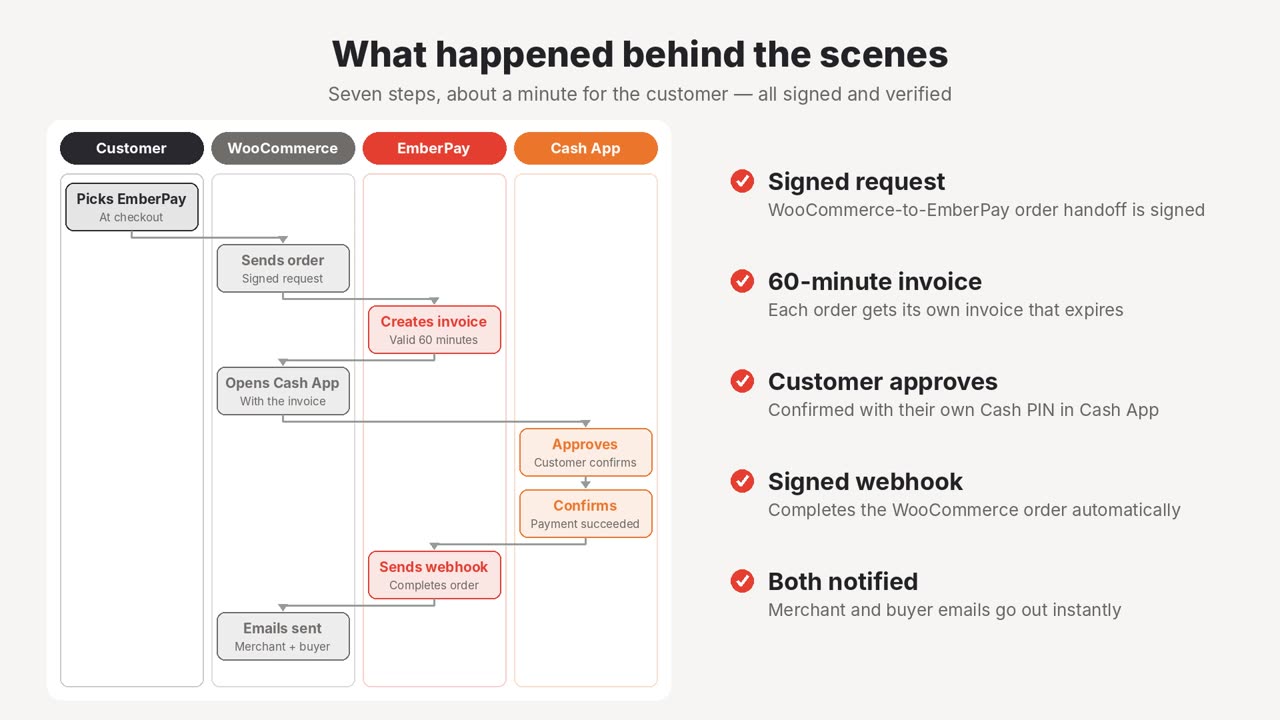
Behind the scenes, WooCommerce sends a signed order to EmberPay, which creates an invoice that stays valid for 60 minutes. The shopper lands on a “Pay for order” page with a QR code and an Open in Cash App button — scan on a desktop, tap on a phone. The amount due is printed right under the code, so there’s no ambiguity about what’s being paid.
Approval in Cash App
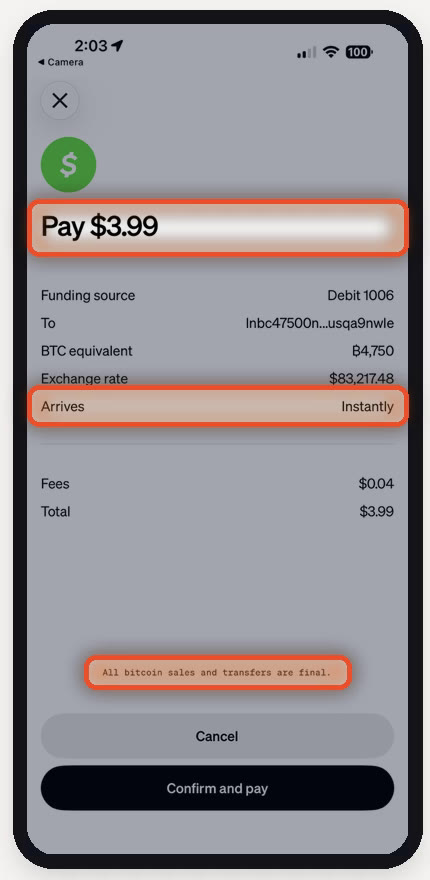
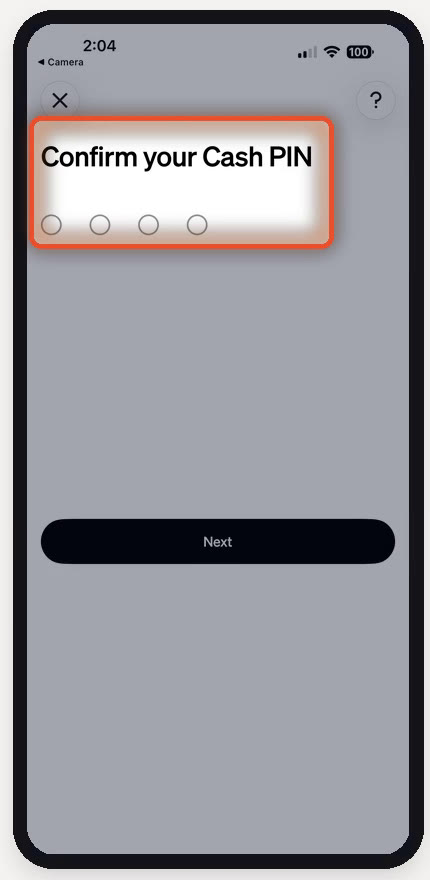
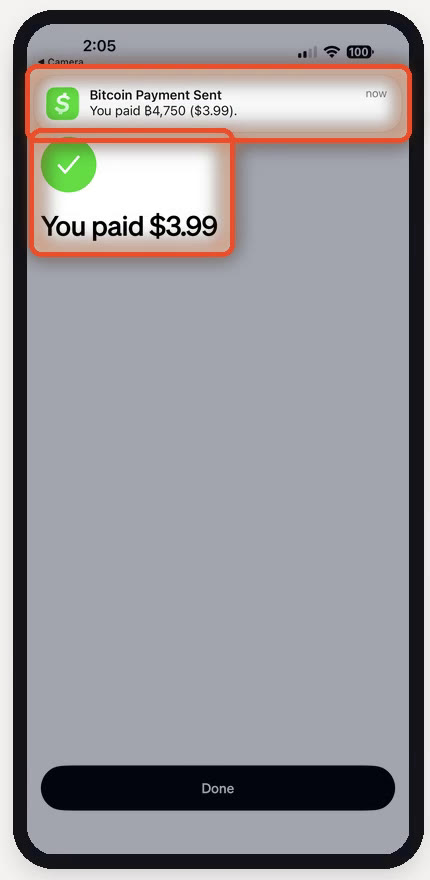
Inside Cash App the customer sees the exact amount before anything happens, then confirms with their own Cash App PIN. In the demo, “Payment succeeded — You paid $3.99” appears within seconds. This is the part that matters most for merchants: the approval screen states that the transfer is final, which is why EmberPay can advertise no chargebacks. Look closely at the frame and you’ll see the payment settles over Cash App’s Lightning (bitcoin) rails, with Cash App converting the customer’s dollars on the spot. The customer never handles crypto, and the merchant still gets dollars to the bank.
“The exact amount is shown up front. Funds arrive instantly and the payment is final.”
The order completes itself
Once the customer approves, EmberPay fires a signed webhook back to WooCommerce and the order flips to paid automatically — no checking a phone and no manual reconciliation. The order-received page loads, and both merchant and buyer get their confirmation emails. The video’s “behind the scenes” diagram sums it up as seven steps across four parties (customer, WooCommerce, EmberPay and Cash App) taking about a minute of the customer’s time.
The Distributor Portal
The second half of the video tours the merchant back office, and it’s more polished than we expected:
- Plugin downloads. The Cash App plugin and the EmberPay credit/debit card plugin both download from the portal, with step-by-step activation notes. Updates keep your settings.
- Credentials in one place. Your website ID and API key are ready to copy into WooCommerce, with one-click credential reset and a built-in redirect allowlist.
- Real-time transaction reports. Pick a date range and see every Cash App payment with amount, authorization number, wallet and payment ID — searchable, sortable and exportable to Excel. The demo’s own $3.99 order sits on the top row.
What we liked
- Two taps for the customer; no card number typed anywhere
- Final payments mean no chargebacks or “friendly fraud”
- Orders complete automatically via signed webhook
- Real installable WordPress plugins, not a custom integration
- Clean, exportable transaction reporting
- Daily payouts to your bank account
What to weigh
- At 5% per transaction it costs more than typical card processing — the trade is chargeback protection
- The $199/month portal fee favors stores with steady volume
- Only shoppers who use Cash App can pay this way, so keep a card option alongside it
- Because payments are final, refunds have to be handled as a separate step
- The Cash App approval screen shows bitcoin details, which may surprise some shoppers
The verdict
EmberPay’s Cash App checkout does what the demo promises: a short, PIN-secured checkout that settles instantly, completes the WooCommerce order on its own and can’t be charged back. For merchants who lose real money to disputes — or who simply want a fast, phone-native way for customers to pay — the higher per-transaction rate buys meaningful protection. Run it next to EmberPay’s card plugin so every shopper has a way to pay, and you get the best of both.
This review describes the features shown in EmberPay’s demo video. EmberPay is offered through Ember Services. Cash App is a trademark of Block, Inc.; it is named here only to identify the payment method.